What does OrderEmailFix provide?
OrderEmailFix provides independent WooCommerce order-email configuration repair, from $99 USD for one store and one agreed issue. Eligible work includes one sending-provider connection, applicable sender authentication and a controlled order-email test. You agree on scope, access, timing and separate costs before payment, then receive a written record of changes and observed test results.
Where are WooCommerce SMTP settings?
WooCommerce core settings control the notification, recipient, sender identity, template and preview under WooCommerce → Settings → Emails. The SMTP host, port, login or provider API connection belongs to the WordPress mail integration you use. A store can therefore have correct WooCommerce email settings and a failed sending connection, or a working connection and a notification that never ran.
WooCommerce's SMTP provider guide explains the mail-provider layer. Before replacing a plugin or buying another plan, match one affected notification to its transactional log and the provider response. That evidence decides whether the repair belongs in WooCommerce settings, the mail integration, DNS authentication or the recipient mailbox.
Repair lab: a disabled New order alert
We deliberately disabled the admin New order notification in a WooCommerce test store, reproduced the missing alert, then enabled it and tested a fresh order. These are actual sandbox logs and captured messages from October 11, 2026.
- Environment
- WordPress Playground
WooCommerce 11.2.1
WordPress 7.1.2 · PHP 8.3.33 - Test event
- Manually created orders changed from Pending payment to Processing.
- Test data
- One $10 demo product.
Recipients atexample.invalid.
- Reproduce the symptom. With New order disabled, order #12 produced a
disabledlog entry for the admin alert. The separate customer Processing email was captured. - Change the relevant setting. Enable New order:
new_order.enabledchanged fromnotoyes. No sending-provider or DNS configuration was changed. - Repeat the event on a fresh order. Order #13 followed the same Pending payment → Processing transition. Its New order alert was logged as
sentand captured locally forstore-ops@example.invalid, alongside the customer email.
Before and after: native log excerpts
The transactional-emails log recorded the admin notification separately for each order. These excerpts preserve the observed timestamps and outcome text:
2026-10-11T20:31:12+00:00 NOTICE
Email "new_order" for order #12 not sent: email type is disabled2026-10-11T20:32:36+00:00 INFO
Email "new_order" for order #13 sent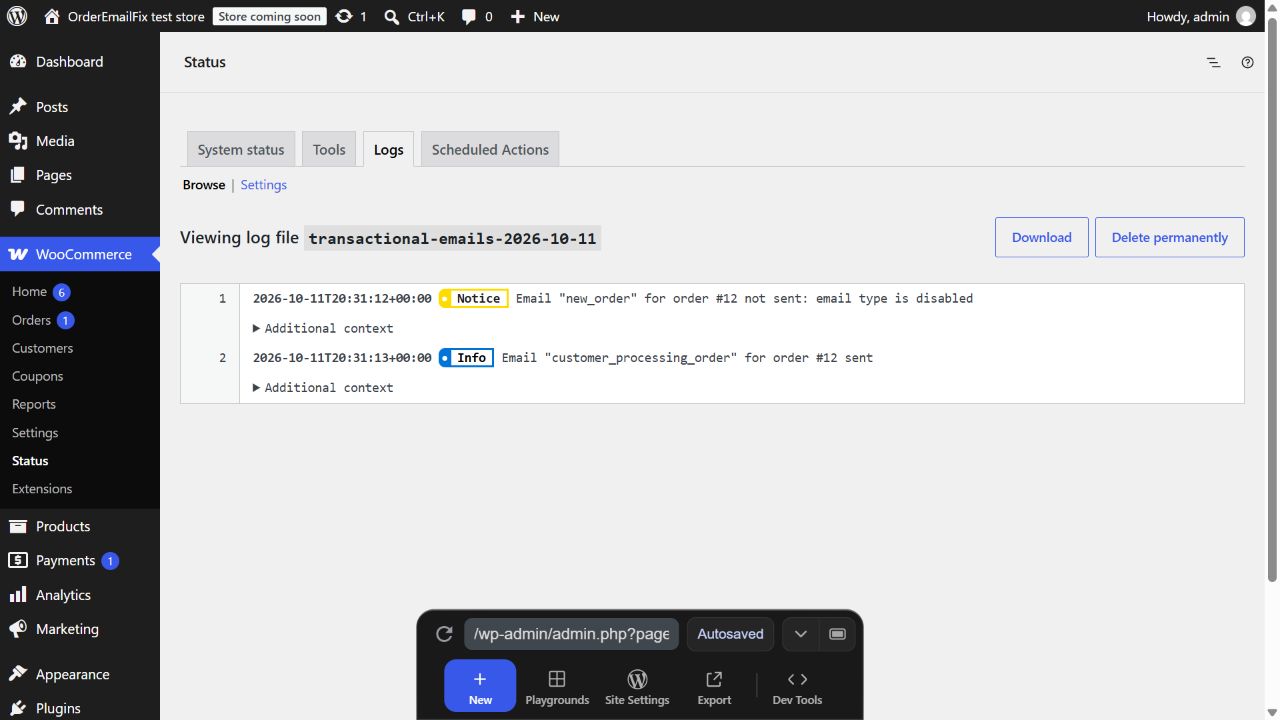
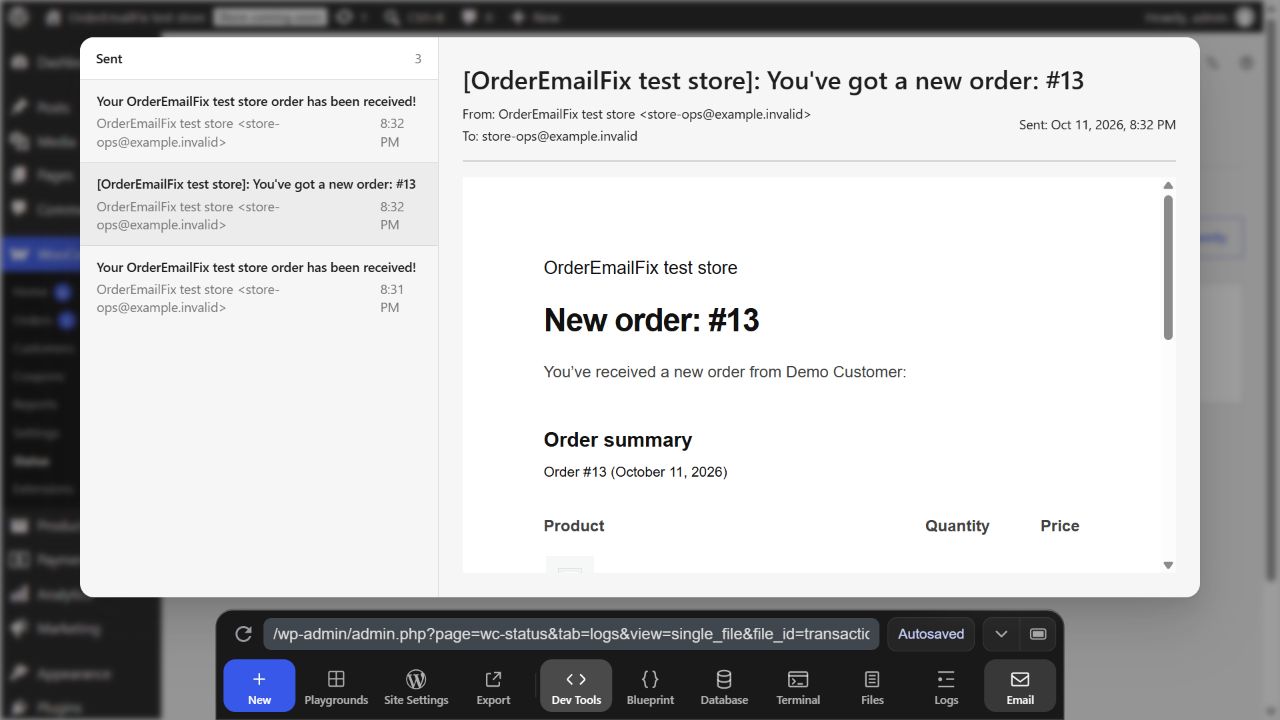
store-ops@example.invalid, with order #13 in its subject and body. The separate customer receipts remain visible in the message list. Open full-size capture image.Enabling the admin notification changed the observed result from disabled to generated and captured for the next test order. This was a manual order-status event, not a checkout or payment test. Playground kept the messages inside the browser: no external delivery, SMTP connection, DNS authentication or Gmail inbox placement was tested. This is a self-initiated demonstration, not a client case study.
WooCommerce's email troubleshooting reference explains disabled and sent outcomes. The official Playground Email tool documentation explains local capture and its delivery limits.
For your store, the acceptance test must match the notification and workflow that failed. Describe the missing alert so we can agree on the right checks before payment.
A focused repair task for your agency
Have a client with a missing WooCommerce order notification? Request a review of one configuration task. Standard repair starts at $99 USD for one store and one agreed order-email issue.
- Agree on the task. Identify the notification, evidence to review, permitted changes, access, price and timing before work.
- Test the affected workflow. Agree on the order event and recipient to check, then record the observed result.
- Receive a useful handover. Get a written record of the investigated fault, configuration changes, test evidence and remaining limitations.
Review the controlled repair lab above and its completed sandbox handover (plain text). They show notification troubleshooting and the report format. They are educational work samples, not a client engagement or an external inbox-delivery test.
For the first enquiry, include the store URL, affected notification, relevant redacted evidence if available, and confirmation that you are authorised to arrange the work. Leave credentials and customer records out. Provider costs and work outside the standard scope are agreed separately.
Is provider setup the right next step?
A dedicated sending connection can help when your store generates an email but its existing mail path fails. It cannot generate an order notification that was disabled or never triggered. Use the evidence below to choose the appropriate enquiry.
| What you observe | What to investigate |
|---|---|
| The email attempt fails with a connection or authentication error. | Review the selected provider, plugin connection and sending permissions. |
| The provider reports a sender-domain authentication problem. | Check the actual From domain and the provider's required DNS records. |
| There is no matching order-email attempt. | Check transactional logging coverage, then the order trigger and notification settings. |
| A test email arrives, but checkout emails do not. | Compare the tests using the SMTP test versus order-email guide. |
WooCommerce's official troubleshooting guide distinguishes generated attempts and sending outcomes. We review the fault before agreeing that a new connection is the appropriate repair.
WooCommerce SMTP errors: connection, login or sender?
Match the affected order, notification and time to the full provider response. A failed connection, rejected login and unapproved From address require different checks. The examples below describe diagnostic clues; they are not results from a client repair.
On a small screen, scroll the table sideways to compare the error and next check.
| Error or evidence | What to check |
|---|---|
| Could not connect or a connection timeout | Compare the hostname, supported port and encryption with the provider’s instructions, then check hosting connectivity. This message alone does not identify the cause or establish a wrong password. |
| Authentication failed during SMTP login | Check the selected provider account, required login method and permission to send. Some providers require an app password, OAuth or provider-specific credentials. Follow that provider’s current requirements. |
| From address or sender signature not confirmed | Compare the actual order-email From address with the provider’s approved sender. For example, Postmark’s sender-signature error concerns an unconfirmed From address; it is a different check from login credentials. |
The PHPMailer troubleshooting reference explains connection failures, and Postmark’s SMTP error guide describes its provider-specific responses. Its sender-signature explanation covers the From-address case.
SMTP login authentication is different from SPF and DKIM
Login authentication authorises the connection to your sending service. SPF and DKIM concern sender-domain authentication evaluated along the delivery path. A login failure does not by itself establish a DNS fault. Use the sender-alignment checks when the message was accepted but domain authentication or mailbox filtering is the issue.
Why can the SMTP test work while an order email fails?
Compare the From address used by both messages as well as their recipients and times. In WP Mail SMTP, Force From Email applies the configured sender across site messages. Review the intended sending identities before enabling it; it can affect other plugins’ notifications. The official setting guide explains that override. After an agreed correction, retest the affected order notification, rather than relying only on the plugin test.
One store, one provider, a clear handover
- Review of the affected notification, sender and available error evidence.
- Configuration of one suitable provider through a compatible WordPress mail integration.
- Applicable sender authentication corrections for one agreed sending domain.
- A controlled test of the affected WooCommerce order-email workflow.
- A written record of changes, observed results and remaining limitations.
Accounts, sending limits, domain permissions and the existing plugin determine eligibility. Multi-store work, custom development, payment-gateway faults and complex conflicts require a separate quote. Review the complete repair scope.
SMTP or API: use a supported connection
A mail integration connects WordPress to the chosen provider. SMTP uses the provider's mail-server connection; some integrations use its API instead. The appropriate method depends on the provider and plugin you already use. We confirm compatibility before proposing changes.
WooCommerce explains the sending-provider handoff in its SMTP provider documentation. An existing supported connection may only need correction, rather than a replacement plugin or another paid subscription.
Authentication follows the actual sender
Domain records must match the provider that sends the message. Review its SPF and DKIM requirements and whether authentication aligns with the visible From domain for DMARC. DNS edits should preserve unrelated website and receiving-mail records.
The WooCommerce authentication guide explains these checks. Provider setup is not a promise of universal inbox placement; recipient filtering and sender reputation can still affect delivery. If the message is already sent but lands in spam, use the Gmail original-message check and sender-alignment example in our spam guide.
The acceptance test uses the affected notification
A plugin test alone does not verify checkout. The written scope identifies the notification, test recipient and workflow. After an approved correction, the handover records the order event, available mail or provider evidence, and observed receipt. If a step remains unverified, the report says so.
Notification tested → configuration changed → mail-system outcome → recipient result → remaining issue. This is a report format, not a claim about a completed client repair.
Request setup without sending credentials
Include your store URL, sending provider or mail plugin if known, affected notification and a redacted error message. Leave passwords, API keys and customer records out. Access, timing and any separate costs are agreed before work starts.